10 Best eSIM for Hotspot Tethering 2026 | Share Data

The hotel WiFi drops again mid-Zoom call, and your client's face freezes at the worst possible moment. Public networks in airports, cafes, and co-working spaces fail travellers more often than people expect.
A reliable eSIM for Hotspot Tethering turns your phone into a portable WiFi router, sharing fast LTE or 5G data with your laptop, tablet, or a travel partner's device. That single feature separates a productive workday abroad from a frustrating one.
Global eSIM connections reached 1.2 billion devices in 2025 and are projected to hit 1.5 billion in 2026, with travel remaining the primary adoption driver. Not every eSIM plan allows tethering, though.
Some providers block it silently, others throttle shared connections, and a few charge extra for the privilege.
This guide breaks down the 10 best eSIM for hotspot tethering providers that explicitly support WiFi, Bluetooth, and USB data sharing across devices.
Why Not Every eSIM Plan Supports Hotspot Tethering in 2026
An eSIM for hotspot tethering works exactly like a traditional SIM card when sharing data. Your phone broadcasts a WiFi signal, and nearby devices connect to it just like any other wireless network .
The difference is that some eSIM providers restrict this feature at the carrier level. The plan might work perfectly for on-device browsing but block all shared connections to your laptop.
Three factors determine whether your eSIM for hotspot tethering actually works. First, the provider's data plan must explicitly allow tethering. Second, your device must support both eSIM and hotspot features (most phones from 2020 onwards do). Third, local regulations in certain countries may limit shared connections even when the provider allows them.
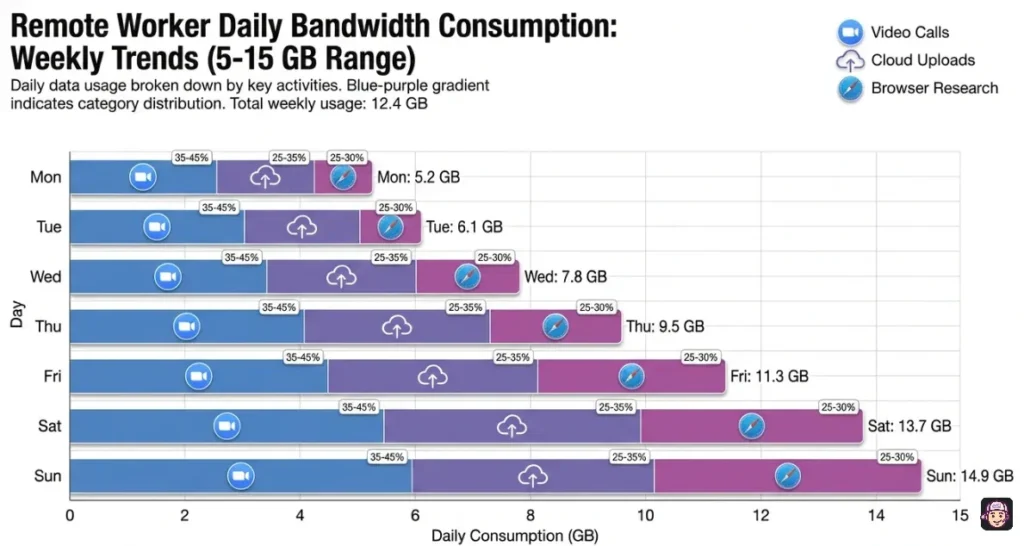
Remote workers and digital nomads burning through 5 to 15GB per week on video calls, cloud uploads, and browser research need plans with generous daily allowances. A plan that throttles after 1GB makes hotspot sharing essentially useless for professional work.
For an eSIM for hotspot tethering, unlimited plans with daily high speed buckets of 3GB or more outperform fixed data bundles because they reset every 24 hours. Prioritise providers like Saily that explicitly state “no hotspot restrictions” across all their plans.
Which eSIM for Hotspot Tethering Matches Your Device Setup
| eSIM for Hotspot Tethering | Tethering Policy | Best Device Setup |
|---|---|---|
| Saily | Fully unrestricted sharing | Phone plus laptop workers |
| Airalo | Supported with APN setup | Multi-country backpackers |
| Amigo eSIM | Permitted on most plans | Europe corridor nomads |
| GigSky | Supported across plans | Free trial testers |
| Billion Connect | Allowed on paid tiers | Budget solo travellers |
| MobiMatter | Carrier dependent rules | Price comparison shoppers |
| Maya | Full hotspot support | Video call professionals |
| Lotso Travel | Permitted with top-ups | Flexible schedule workers |
| Instabridge | Cellular plus WiFi hybrid | Urban cafe hoppers |
| iRoamly | Unrestricted premium tiers | High bandwidth creators |
1. Saily
Saily stands alone among eSIM for hotspot tethering providers with a clear, published policy of zero restrictions on data sharing across every single plan.
Whether you buy a 1GB local bundle or the Ultra unlimited global tier, tethering works without limits. The Ultra plan delivers 30GB of high speed data monthly across 121+ destinations, dropping to 1 Mbps after that. WiFi, Bluetooth, and USB tethering all work.
Built-in web protection from the NordVPN team secures your shared connection when working from cafes or hotel lobbies.
👉Get Saily for Hotspot Tethering
Why Saily for eSIM for Hotspot Tethering: The explicit “no tethering limits” policy removes all guesswork. Most providers bury their hotspot rules in fine print. Saily publishes it clearly. The NordVPN security layer also encrypts your shared connection, which matters when your laptop connects through a phone broadcasting in a public space.
2. Airalo
Airalo supports hotspot tethering across most plans but requires manual APN configuration on some devices for shared connections to work properly.
The personal hotspot APN must match the eSIM installation details exactly, typed in lowercase as one word. Once configured, the eSIM for hotspot tethering works reliably across 200+ countries.
Regional Europe plans covering 39 countries perform well for nomads tethering laptops while moving between co-working spaces in Lisbon, Barcelona, and Berlin.
Why Airalo for eSIM for Hotspot Tethering: The 200+ country marketplace means you will find a tethering capable plan regardless of where you work remotely. The APN setup adds one extra step, but once configured, the hotspot runs stably. Their help centre publishes exact APN strings for every plan, which removes trial and error.
3. Amigo eSIM
Amigo permits hotspot tethering on most European and Asian plans, making it a practical eSIM for hotspot tethering across the Mediterranean digital nomad corridor.
Speeds through Vodafone and Orange partnerships in Italy, Spain, and France hold up well for shared connections. Installation takes under three minutes via QR code, and the hotspot feature activates without any extra APN changes on most devices.
Travellers working from Lisbon cafes or Split co-working spaces get consistent tethered speeds for video calls and document uploads.
👉Get Amigo eSIM for Hotspot Tethering
4. GigSky
GigSky lets you test hotspot tethering for free before spending anything. The 100MB trial plan (500MB across Europe) confirms whether your device and their carrier partner produce stable shared connections at your exact location.
Most paid plans support tethering, and the 5G capability in supported cities means your tethered laptop can reach download speeds that rival hotel broadband. This makes Gigsky a smart first step for anyone nervous about whether their eSIM for hotspot tethering will actually work at their destination.
👉Get GigSky for Hotspot Tethering
Why Gigsky for eSIM for Hotspot Tethering: No other provider lets you verify hotspot performance for free. The 500MB European trial is enough to run a 20-minute test video call through your tethered laptop and confirm speeds, stability, and latency before committing to a paid plan.
5. Billion Connect

Billion Connect offers plans starting at $0.70, making it the most accessible eSIM for hotspot tethering when budget matters more than bandwidth.
Tethering works on paid data plans across 200+ countries. The BC eSIM app activates your connection in roughly two minutes through a QR scan.
For travellers who only need to tether briefly to send emails or upload a document, the low entry price avoids overpaying for features you will not fully use.
6. MobiMatter
Mobimatter aggregates plans from multiple carriers, which means tethering support varies by the specific plan and carrier you select.
The marketplace model lets you filter for eSIM for hotspot tethering plans by checking each carrier's terms before purchase. Some Mobimatter plans through Bouygues include voice calling alongside tethering capable data at 60GB for $39.99, a combination almost no other provider offers.
The trade-off is that you must read each plan's fine print carefully, as tethering rules differ between carriers on the same platform.
7. Maya
Maya publishes one of the clearest tethering policies in the market. Their eSIM for hotspot tethering plans allow full device sharing, and the fair use policy gives you 3GB of high speed data daily before a gentle drop to 10 Mbps.
That throttled 10 Mbps is still fast enough to run a Google Meet call or upload medium sized files from your tethered laptop. The daily reset means heavy tethering days do not permanently slow your plan for the rest of the trip.
Why Maya for eSIM for Hotspot Tethering: The 10 Mbps throttled speed after 3GB daily is genuinely useful for tethered work, unlike providers that drop to 128 Kbps or 256 Kbps. A 10 Mbps connection handles standard definition video calls, email, and document editing without issues.
8. Lotso Travel
Lotso Travel adds mid-trip flexibility that most eSIM for hotspot tethering providers lack. Heavy tethering burns through data faster than on-device browsing, and running out mid-project is a real risk.
Lotso Travel lets you top up data without purchasing an entirely new eSIM profile, keeping your hotspot configuration intact.
For remote workers with unpredictable schedules who might tether heavily one week and barely at all the next, this adaptability matters.
9. Instabridge
Instabridge takes a hybrid approach to the eSIM for hotspot tethering problem. The app maps millions of free WiFi access points worldwide, letting you switch between cellular tethering and nearby wireless networks depending on which delivers better speeds.
When the cafe WiFi works, save your cellular data. When it drops, your eSIM hotspot takes over. This strategy extends your data allowance significantly during long working days in cities like Bangkok, Lisbon, or Mexico City.
10. iRoamly
iRoamly offers premium tiers with truly unrestricted bandwidth and no speed reductions, the purest form of eSIM for hotspot tethering available.
Their AI algorithm analyses your usage patterns and recommends the plan best suited for heavy tethering workloads. Dual SIM management keeps your home number active for two-factor authentication while the eSIM handles all shared data traffic.
Content creators uploading large video files through tethered connections benefit from the zero-throttle premium tier.
Bandwidth Drain Patterns When Using an eSIM for Hotspot Tethering
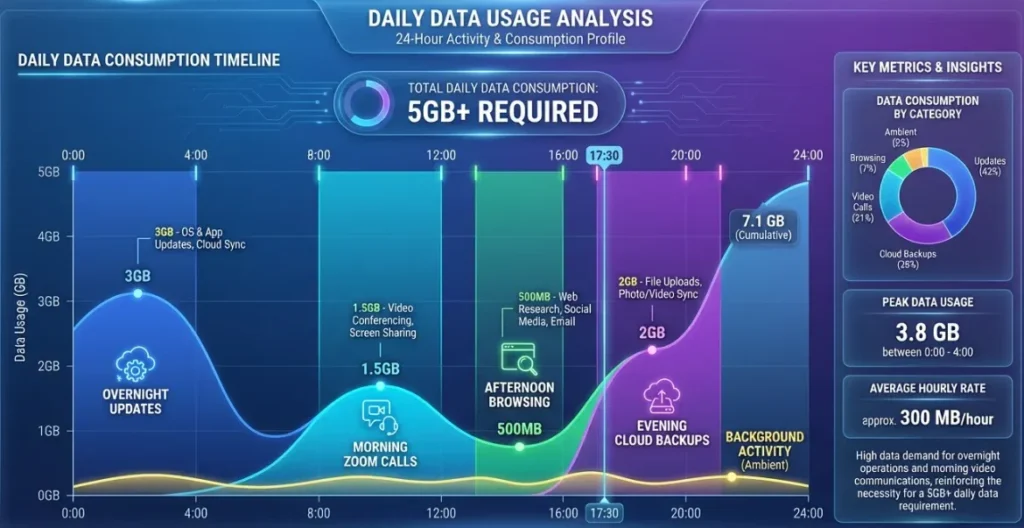
Tethered devices consume data differently than phones. A laptop running Chrome with 15 open tabs, Slack, and a cloud backup service can burn through 500MB per hour without any video streaming. Understanding these patterns helps you choose the right eSIM for hotspot tethering plan size.
A one-hour Zoom call uses roughly 1.2 to 1.5GB in HD quality. Google Meet and Microsoft Teams consume slightly less at around 800MB per hour. If you run two to three calls daily while tethered, your eSIM for hotspot tethering needs at least 5GB daily at usable speeds. Saily's 5GB daily full speed bucket or Maya's 3GB plus 10 Mbps fallback both handle this workload.
Background services are the hidden data thieves. Turn off automatic OS updates, cloud photo backups, and app auto-downloads before enabling your hotspot.
These processes alone can consume 2 to 3GB overnight if left unchecked. Switching your hotspot band from 2.4 GHz to 5 GHz improves speed for nearby devices but slightly reduces range, a useful trade-off in small hotel rooms or cafe corners.
USB tethering deserves more attention than it gets. Connecting your laptop directly via cable delivers more stable speeds than WiFi tethering, uses less phone battery, and avoids wireless interference entirely . If your eSIM for hotspot tethering plan supports USB sharing, use it for important calls and large uploads.
Troubleshooting Your eSIM for Hotspot Tethering Connection
How do I activate hotspot on my eSIM for hotspot tethering plan?
On iPhone, go to Settings then Mobile Service then Personal Hotspot and toggle “Allow Others to Join.” On Android, go to Settings then Connections then Mobile Hotspot and Tethering. Make sure your eSIM line is selected as the active data source before enabling the hotspot.
Which eSIM for hotspot tethering has the most reliable shared speeds?
Saily offers fully unrestricted tethering with 5GB daily at full speed and zero hotspot limitations across all plans. IRoamly's premium tier provides true unlimited bandwidth without any throttling on tethered connections.
How much does an eSIM for hotspot tethering cost?
Plans range from $0.70 on BillionConnect for basic tethering to $8.99 monthly for Saily's Ultra global unlimited plan. Most remote workers spend between $15 and $35 for a 30-day plan with 10GB or more of tethering capable data.
Can my provider detect if I use hotspot with my eSIM?
According to Saily, eSIM providers cannot see that you have set up a hotspot on your device. However, some carriers monitor data patterns and may detect tethering through packet inspection. Plans that explicitly allow hotspot usage eliminate this concern entirely.
Why does my eSIM hotspot keep disconnecting?
Disconnections usually stem from weak carrier signal at your location, battery saver mode limiting background data, or too many devices connected simultaneously. Try reducing connected devices to two or three, disable battery optimisation for your hotspot, and ensure your phone has at least 30% charge.
Is a free eSIM sufficient for hotspot tethering?
Gigsky's free 100MB trial (500MB in Europe) lets you test hotspot functionality but is far too small for actual work. Use the free trial to verify connection quality, then upgrade to a paid plan with at least 5GB for productive tethering sessions.

The Right eSIM for Hotspot Tethering Depends on Your Workflow
Saily earns the top spot for its explicit zero-restriction tethering policy and built-in security features. Maya suits professionals who need the safety net of a 10 Mbps fallback after heavy daily usage.
Gigsky provides the smartest entry point through its free trial, letting you confirm hotspot performance before spending.
For heavy creators and developers pushing large files daily, IRoamly premium plans offer true unthrottled tethering.
Choose based on how much data your tethered devices actually consume, test the connection at your destination, and keep USB tethering as your backup for important moments.
How we test eSIMs
iPhone 15 Pro Max
iPhone 17 Pro Max
Samsung Galaxy S25 ultra
iPad Pro M4
32+ eSIM Providers Tested
150+ Speed Tests Verified
10+ Countries Covered
Why You Can Trust eSIMNinja
We buy every eSIM plan with our own money — no freebies, no sponsored reviews. What you read is what we genuinely experienced.
We keep receipts. Every eSIM is personally purchased.